Thursday, August 6, 2009

HINDU SCALE: Take a break from D to G and use Gm


Lesson #1
The Hindu Scale.

I have no idea what level you are at so the lessons I post will be in no particular order. I just hope to add some tools to your belt so that you have some options.

Video example at the bottom of this post using the Hindu Scale in the solo for "Song Worth Singing" that will be a track on my Talk to the Machine album.

You'll here this scale in so many genres of music. I hear it often in John William's scores which is probably why I enjoy using it.

For this exercise I am using the key of D. Those with some theory knowledge will be able to move this into any key. If you don't know theory I've created a beginner lesson near the bottom.

One of the most widely used chord progressions is D going to G. At some point you may want a change. I am suggesting that you try a G minor chord instead of G and I want to show you a great scale, Hindu, you can use with a D to Gm chord progression. I will use the guitar scale/solo as the example but you can use this for vocal lines, horn harmonies, string orchestrations etc...

The Theory
When you use a D chord going to a G chord (D being your key/tonic) the chords are in the same key (the I and the IV chord) built using the notes of the D major scale D E F# G A B C# D.

Triads: a chord with three notes
If you use a Root, 3rd, 5th starting on D you get D F# A, the notes of the D chord. If you use a R, 3rd, 5th starting on G you get G B D, the notes of a G chord. On the guitar many of these notes are doubled or tripled in a chord but they still only contain 3 note names.

Sub G for Gm
If you substitute G with G minor, certain notes will have to change.
The G minor chord contains the three notes, G Bb D. The G minor scale (the relative minor of Bb major) contains the notes G A Bb C D Eb F G

Alter the D major scale
Now if you alter your D major scale to contain a Bb and a C (from the G minor scale) your scale will look something like this D E F# G A Bb C D. This is the Hindu scale in D.

In relation to the major scale use this formula to move it into any key you want, R 2 3 4 5 b6 b7 8 or TTSTSTT (Tone, Tone, Semi-tone, Tone, Semi-tone, Tone, Tone)

Now try this scale under a D to Gm chord progression. I personally love this scale / chord combo. I may have over used it on my album but I guess that will just be considered the "style" I used.


FOR THE BEGINNER
Play this scale:
---------------------------------------------8--10-
------------------------------7--8--10--11-------
---------------------5--7--9-----------------------
--------4--5--7--8--------------------------------
--5--7---------------------------------------------
---------------------------------------------------
Over these chords:
D / / / Gm / / / D / / / Gm / / / repeat

/ = additional chord strum

What will you do with your Hindu?
Comment & post a link so we can all hear what ya did.

This post originates from

Wednesday, July 29, 2009

Writer's Block


Since 2000 I have written about 18 songs. That's it. Not due to writer's block, I just don't commit issues / topics to song if I can resolve them with a bit of thought. If something sticks in my head and I can't really work it out by thinking it through, I'll write a song about it. The songs that you will eventually hear on Talk to the Machine will be songs that are extremely important to me. Since I am an independent, no one has been waiting around for my stuff so I just let things come when they are ready.

I can't churn out a song a day because I can't and I don't want to. Don't try to be like another writer because you read that they wrote a song a day, or that they recorded 30 songs but kept 10. Let your writing style match who you are. I mostly use nature as my inspiration whereas someone else might get inspired by a gritty city. I wrote a song back in 2005, hated the lyrics so I waited...till 2009 and they finally came to me and the lyrics poured out. (The song is calledDo Not Feed the Wolves). Another song, The Vulture or the Raven, came all at once in about 5 minutes. I've learned not to force the creativity. Let it strike. That doesn't mean be lazy. I still sharpen my tools.

I've been studying music since I was 15 and my advantage is that I have been exposed to so many styles of music and that I can analyze them and figure out what is going on quite quickly, so I can usually implement several ideas quite quickly to see if something will work or not. If you get blocked musically, you may want to take some time to study a style / arrangement that you really like.


I remember in college when I first learned the chord progression Aminor--Aminor(maj7)--Aminor7th--Aminor6th (sounds like Stairway to Heaven intro, but it was a latin piece that I heard it in) I inserted it into about three songs right away.
For those interested I used it in a song called "In Silence" that is on iTunes under Nathan Fleet. I still use it. If I had not concidered studying music (read previous post Self Taught or Learned Theory - you don't have to be schooled to study) I may have never discovered the mechanics of that chord progression. I also use it on the new CD in a track called "The Devil is Coming" and in "The Staircase."

You may not have years to ponder what your song is going to be about so I recommend that you always add tools to your belt, a new chord, a new style, tempo, genre, technique, instrument, accessory etc...Then when the idea hits you have more resources to draw from.

I was trying to think of a clever way to end this post but I got writer's block.

This post originates from
Sunday, July 5, 2009

Aren't CD's dead?

I've been running a poll on my website nathanfleet.com and decided to check in on the results. I am writing a larger article on this but thought I'd touch on the matter a bit now.

I was really surprised to see that the majority of pollsters 52% buy CD's, 27% pay for their downloads and 20% are pirates.

I assume my current 122 pollsters are clinging to the old school "I like the packaging" or they think I can track the fact that they might be pirates. Yes it is a poll but I disagree with it. CD's are dying. The CD section in any music retailer is mostly a ghost town. Between Jan and June this year only 2 of my students brought CD's in to let me hear their music. MP3 players and phones currently rule. I buy on iTunes all the time. I don't need packaging anymore. I am not attached to a format anymore. In the end it is the music I love and if something comes along that removes the current delivery of it, so be it and I am in. Much, much more on this when I finish my article.

So don't YOU think CD's are dead?
This blog originates from

Wednesday, May 20, 2009

Self Taught or Learned Theory?


Rule #1 of songwriting:
If it sounds good, it is good.

That is it. Doesn't matter if it does or doesn't work in theory, or that something is in or out of tune, or that it does or doesn't follow a typical structure. If you like it, that is all that matters. Period.

"Are you schooled or self taught?" Students that are self taught are often very proud of that fact. Their parents, even more proud. Students that learn the theory of music often look back and think that their knowledge somehow molded them into being less creative by following the "rules". The real question should be "Are you creative?"

Regardless of how you learned, the fact is that you learned. We didn't invent music, songwriting, song structure, harmonies, guitars etc...so we really can't take a huge amount of credit for anything. We are simply adding our ideas to the mix.

For the most part. A self taught musician will eventually learn chords from somewhere. A schooled musician will learn that through formal education. You will both end up in the same place but you will have taken different routes.

Example; Danny Elfman is self taught. John Williams is schooled. They are both A-List composers. It is important not to look at the differences but the similarities to see how two ways of learning can land you in the same place. Most likely dedication, the love of the art, study of some kind (self or schooled).

Learning theory doesn't make you a "stale" composer. Writing stale music does that.

I am a schooled musician and I have found that learning theory can eventually speed up the creative process. I have a bunch of tools that I have at my disposal should I choose to use them but that is never what inspires the songs. An idea will pop in my head and it comes out from there. With theory I can understand how to put that idea immediately into action. Without theory it would take me a bit longer but I would eventually get there. Even non-musicians hear music in their head.

If you want to study, I think that is a great idea.
If you don't want to study, I think that is a great idea.
No one learns from nothing. You are a student of something no matter what.

So, are you creative?

This blog originates from


Tuesday, April 7, 2009

Automation - The Machine is Alive


Automation is when things operate with little or no human interaction. If you are a desktop musician, automation will be your good friend. Do you want a fade out at the end of your song? A guitar track to pan left, then right at specific points in your song? Maybe you want the distortion to gradually work it's way into your guitar track or the EQ to change on the same track, without using a new track for just a few seconds of effect. Now lets say you want ALL of these things in the same song. Let's automate. Most programs now have the line-dot way of doing things also called "Node editing." Basically, a line runs underneath the length of your track. That line represents two things

  1. An effect of your choice (volume, pan, distortion...)
  2. The adjustment for that effect (loudness, you hear sound from the left or right, more distortion - less distortion...)

By default the line is set at "+0db
" for volume, "center" for pan

FADE IN and FADE OUT.
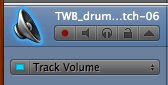
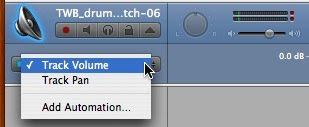
1. Select the automation arrow on the track you want to edit. It is the arrow that is next to the Lock icon on your track. It will reveal a node editing track below the audio file in the track.


Now you will see a drop down menu that will allow you to select Volume or Pan or Effect. Volume is selected by default.


2. You will notice a line that runs horizontally. On this line you will place nodes (dots) by single clicking at an IN point where you want no volume. Now select and OUT point where you want your song to be at full volume.

3. Simple "click-hold" the first node and drag it down as far as it will go. Your line will now look like it has a ramp. This represents your volume increasing or FADE IN.

4. Select an IN point where you want your of your clip or song to get quieter and an OUT point to where you want no volume. "Click-hold" and drag your OUT point down as far as it will go. Now your volume will decrease. 

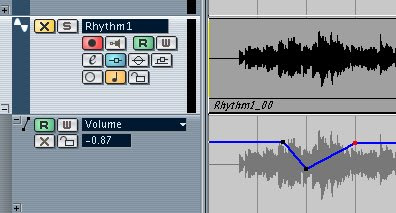
This screen grab shows the volume fading in (line going up), holding at 0db then fading out (line going down).


PAN
1. From the drop down menu at the side of your automation track select "PAN". 
By default your audio is set to Center. This is represented by a line running along the middle of your automation track.


2. Click the point where you want to start a pan and another where you want that pan to end. The click-hold to drag your node up (LEFT) or down (RIGHT)


You can have a track panning and fading in at the same time. Even if you add automation to your additional effects like distortion, EQ etc... they will all operate simultaneously, if you want them to. My friend recently told me how in the past it might take a few guys at a mixing console to operate each effect by turning individual knobs as the song was playing. Now you just need a mouse that clicks.

In Cubase SX1 you will need to reveal the automation track by clicking the "+" sign at the bottom left of your track.


Then select your "draw" tool


Now you can add / drag nodes to your track.

This blog originates from nathanfleet.blogspot.com

Monday, March 30, 2009

Big Guitars - Double Tracking


Double tracking guitars is the process of recording your guitar part on one track and playing the exact same part on another track. There are a few variations of this. 

Audio samples and snapshots of these techniques can be found Here  (link opens in new window) To properly hear this difference you will need Stereo speakers or headphones.

COPY / PASTE METHOD
Record your first part on track (A). Then Copy / Paste (A) on to a new track (B). Now you have the identical part on 2 tracks. You will hear a boost in volume but once you export your track, it will sound the same as a single track so you have to take it a step further. Next you want to pan them apart so you don't have 2 guitars on top of each other. Imagine a stack of coins, you can only see the top coin but you know there are more. Now if you were to spread them out in front of you, you'd see more clearly what amount you had. Same with panning your guitars. For example, if you pan (A) to the left and (B) to the right all of a sudden you will hear 2 guitars covering more "ear space." There are several degrees. "0" which is center and "-64" is far left or "+64" is far right. Before you hear this difference you have to offset your tracks.

To offset take track (B) and move it slightly along your track line. It is best to do this with magnification or zooming in on the tracks. (refer to your software manual and you will find a zoom option) Once you have zoomed in on your tracks, you can click-hold one track (B) and move it so that it is not perfectly in line with (A). This will create even more "ear space" and make your guitars sound more full, and increase the stereo effect. Let your ear be your guide. If it doesn't sound right, move it a bit more, or less.

TROUBLESHOOTING 
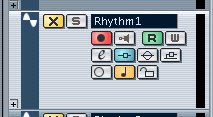
You may experience your track automatically jumping to a specific point, rather than the small increment you want. This is called SNAPPING. Your program will allow you to turn this on or off. In Garage Band, under the Control menu, it is simply called "Snap to Grid." In Cubase you will find a button at the top, when lit, snapping is on. (pictured below)


The benefits of Snapping is to line things up directly to a bar or beat but when you are doing slight movements. Turn it off.

PLAY IT TWICE
Randy Rhoads often played his tracks 2,3 or 4 times to get a huge guitar sound. Some love it, others...not so much. I loved his playing but I am personally not fond of the recording method. He had the talent to nail it each time. If you don't it will sound sloppy so you have to really know your part. For this method simply record track (A), then record your part again on track (B). You could offset them as above but often your playing won't be spot on so the offset may not be necessary. 

TROUBLESHOOTING
If your tracks still sound thin you may want to try:
  • Changing the sound of (B) so it sounds like 2 guitar players. Even switching pickups may do the trick.
  • Don't play the part exact. If you loosen up (B) you end up filling more "ear space." This requires a bit of pre-practice unless you are a good improv musician.
  • Try using a different guitar, if you did a track (A) with electric, use acoustic for (B). If you do this you may want to loosen up the track as mentioned above.
  • By "loosen" I mean play counter rhythms, A different, but complimenting strumming pattern.
I prefer recording 2 different parts. I find that it fills the space so much better but when you have a heavy riff that begs to be huge, double it or copy/paste/offset.

Audio samples and snapshots of these techniques can be found Here 
(Link opens in new window) To properly hear this difference you will need stereo speakers or headphones.